Nexus - TypeScript SDK
Run the Temporal Development Server with Nexus enabled
Prerequisites:
- Install the latest Temporal CLI (
v1.3.0or higher recommended) - Install the latest Temporal TypeScript SDK (
v1.12.3or higher)
The first step in working with Temporal Nexus involves starting a Temporal Server with Nexus enabled.
temporal server start-dev
This command automatically starts the Temporal development server with the Web UI, and creates the default Namespace. It uses an in-memory database, so do not use it for real use cases.
The Temporal Web UI should now be accessible at http://localhost:8233, and the Temporal Server should now be available for client connections on localhost:7233.
Create caller and handler Namespaces
Before setting up Nexus endpoints, create separate Namespaces for the caller and handler.
temporal operator namespace create --namespace my-target-namespace
temporal operator namespace create --namespace my-caller-namespace
For this example, my-target-namespace will contain the Nexus Operation handler, and you will use a Workflow in my-caller-namespace to call that Operation handler.
We use different namespaces to demonstrate cross-Namespace Nexus calls.
Create a Nexus Endpoint to route requests from caller to handler
After establishing caller and handler Namespaces, the next step is to create a Nexus Endpoint to route requests.
temporal operator nexus endpoint create \
  --name my-nexus-endpoint-name \
  --target-namespace my-target-namespace \
  --target-task-queue my-handler-task-queue
You can also use the Web UI to create the Namespaces and Nexus endpoint.
Make Nexus calls across Namespaces in Temporal Cloud
This section assumes you are already familiar with how to connect a Worker to Temporal Cloud.
The tcld CLI is used to create Namespaces and the Nexus Endpoint, and mTLS client certificates will be used to securely connect the caller and handler Workers to their respective Temporal Cloud Namespaces.
Install the latest tcld CLI and generate certificates
To install the latest version of the tcld CLI, run the following command (on macOS):
brew install temporalio/brew/tcld
If you don't already have certificates, you can generate them for mTLS Worker authentication using the command below:
tcld gen ca --org $YOUR_ORG_NAME --validity-period 1y --ca-cert ca.pem --ca-key ca.key
These certificates will be valid for one year.
Create caller and handler Namespaces
Before deploying to Temporal Cloud, ensure that the appropriate Namespaces are created for both the caller and handler. If you already have these Namespaces, you don't need to do this.
tcld login

tcld namespace create \
	--namespace <your-caller-namespace> \
	--cloud-provider aws \
	--region us-west-2 \
	--ca-certificate-file 'path/to/your/ca.pem' \
	--retention-days 1

tcld namespace create \
	--namespace <your-target-namespace> \
	--cloud-provider aws \
	--region us-west-2 \
	--ca-certificate-file 'path/to/your/ca.pem' \
	--retention-days 1
Alternatively, you can create Namespaces through the UI: https://cloud.temporal.io/namespaces.
Create a Nexus Endpoint to route requests from caller to handler
To create a Nexus Endpoint you must have a Developer account role or higher, and have NamespaceAdmin permission on the --target-namespace.
tcld nexus endpoint create \
  --name <my-nexus-endpoint-name> \
  --target-task-queue my-handler-task-queue \
  --target-namespace <my-target-namespace.account> \
  --allow-namespace <my-caller-namespace.account> \
  --description-file description.md
The --allow-namespace is used to build an Endpoint allowlist of caller Namespaces that can use the Nexus Endpoint, as described in Runtime Access Control.
Alternatively, you can create a Nexus Endpoint through the UI: https://cloud.temporal.io/nexus.
Observability
Web UI
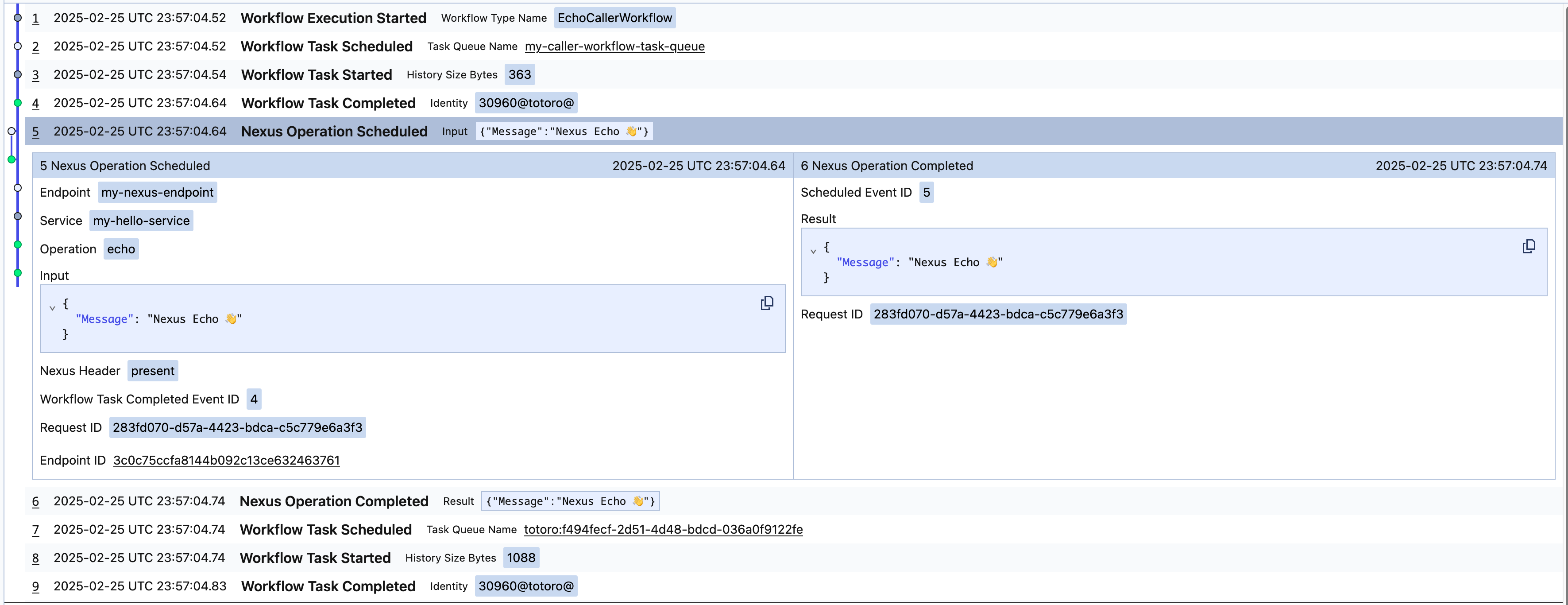
A synchronous Nexus Operation will surface in the caller Workflow as follows, with just NexusOperationScheduled and NexusOperationCompleted events in the caller's Workflow history:
Observability Sync
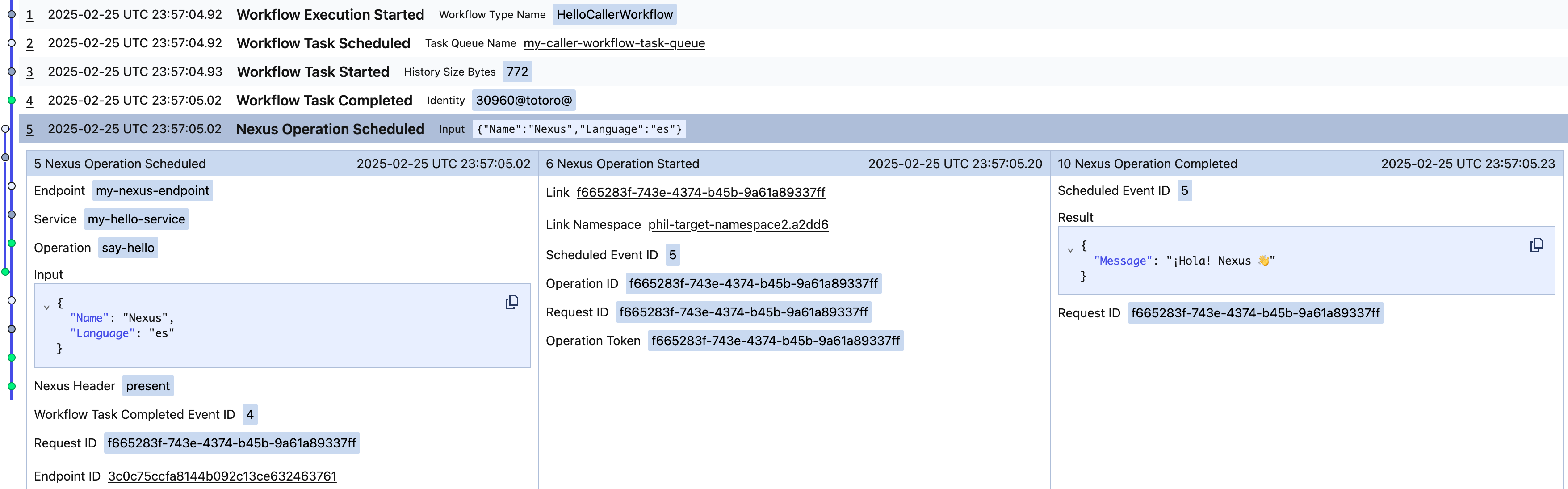
An asynchronous Nexus Operation will surface in the caller Workflow as follows, with NexusOperationScheduled, NexusOperationStarted, and NexusOperationCompleted, in the caller's Workflow history:
Observability Async
Temporal CLI
Use the workflow describe command to show pending Nexus Operations in the caller Workflow and any attached callbacks on the handler Workflow:
temporal workflow describe -w <ID>
Nexus events are included in the caller's Workflow history:
temporal workflow show -w <ID>
For asynchronous Nexus Operations the following are reported in the caller's history:
NexusOperationScheduledNexusOperationStartedNexusOperationCompleted
For synchronous Nexus Operations the following are reported in the caller's history:
NexusOperationScheduledNexusOperationCompleted
NexusOperationStarted isn't reported in the caller's history for synchronous operations.